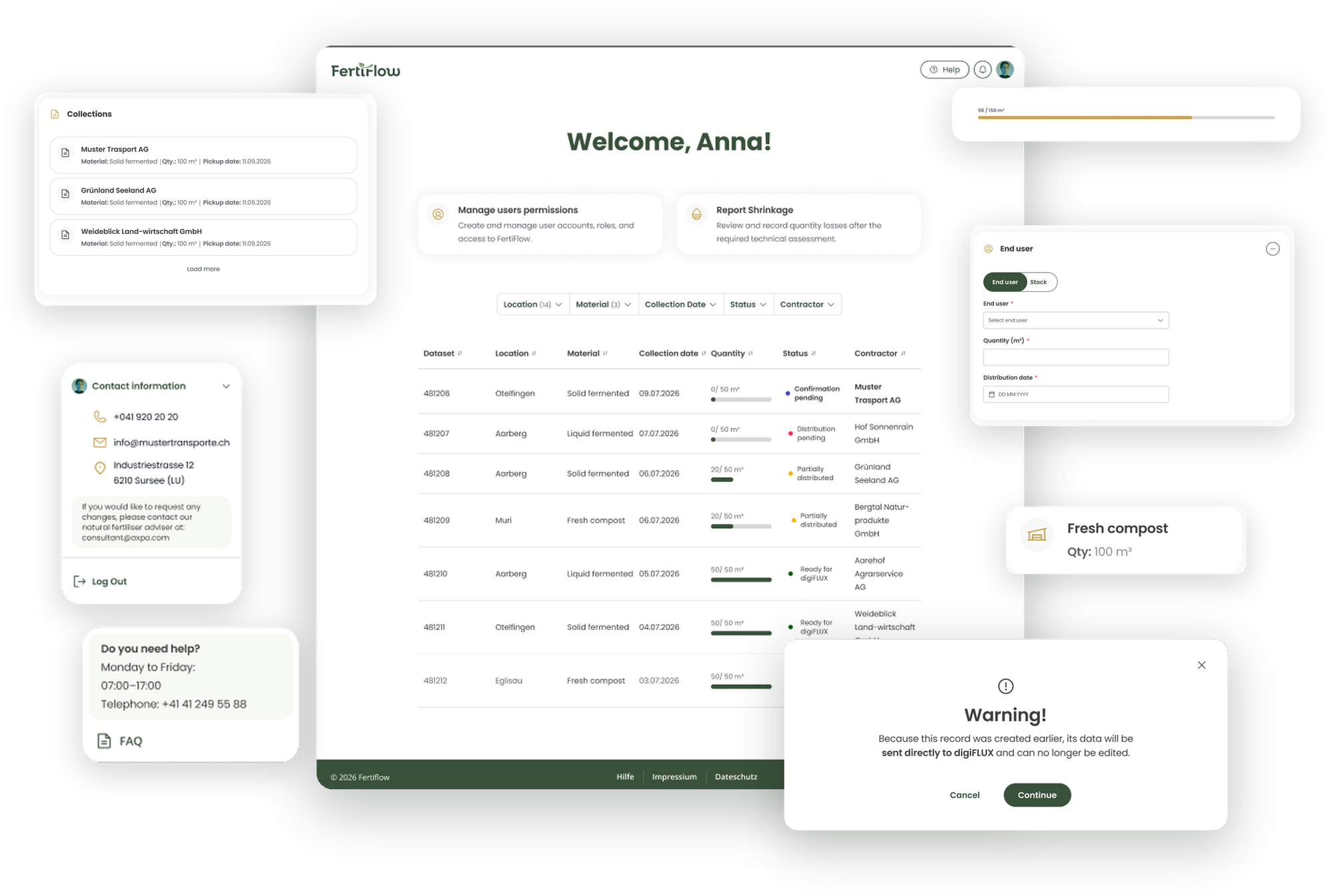
FertiFlow is a digital platform designed to make fertiliser delivery reporting in Switzerland simpler, clearer and more traceable.
The project transforms a fragmented process involving paper forms, spreadsheets, emails and several business systems into a connected digital workflow.
I worked on the project from early process and User Experience (UX) definition through to an Minimum Viable Product (MVP) concept and interactive prototype, focusing on information architecture, interaction design, UX writing, visual direction and design-system thinking.
Company: Axpo
Role: UX Designer
Date: 2026
Agile Product Development · UX Design · Information Architecture · Design System · User testing · AI prototyping
The spark
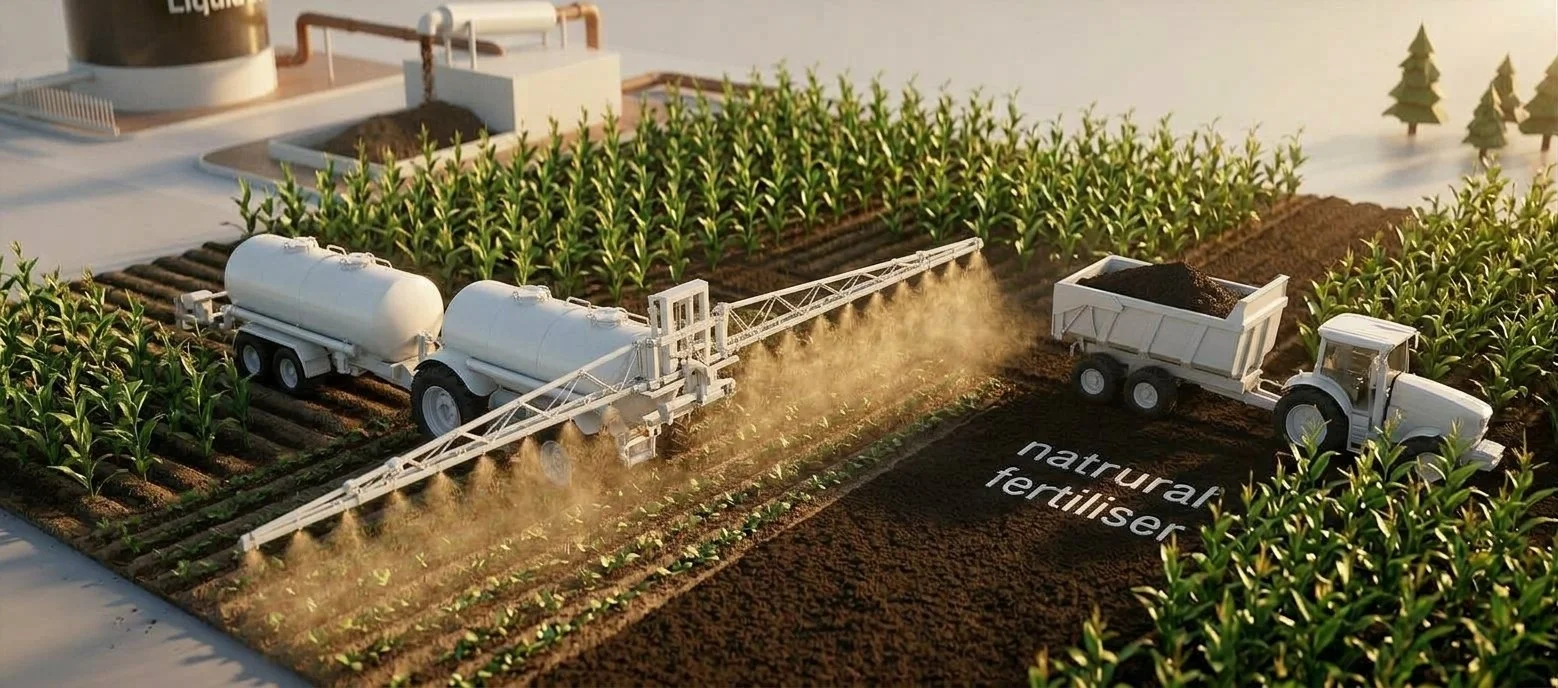
Fertiliser reporting in Switzerland is a process where small gaps can create significant operational consequences.
Today, information about fertiliser deliveries can move through paper forms, PDFs, spreadsheets, emails and several business systems before it reaches reporting and billing. That creates extra manual work, increases the risk of incomplete information and makes it harder to know whether a delivery has been recorded correctly.
With the upcoming federal requirements, there was an opportunity to rethink the process. The goal was not to put an existing paper form on a screen. It was to create a connected digital workflow that makes compliance part of the process, not another administrative task.
The central question became:
How might we make a compliance-critical process feel as straightforward as recording a delivery?
The challenge
The process involved different people, different responsibilities and several systems working together:
Contractors needed to confirm collected quantities and allocate them to end customers.
Admins needed to review, validate and monitor submissions.
Biomass plant employees needed to see the pickups in their facilities and contact the relevant person in case of problems.
The challenge was to make this complexity understandable without making users understand the complexity of the system itself.
There was also an important adoption challenge. Fertiflow was introducing a new digital way of working into a process that contractors were already used to completing on paper. The experience needed to be easy enough to understand and trust that users could confidently adopt a new way of working.
“Contractors are used to filling in this information on paper from a tractor, and now we are asking them to use new devices, platforms and understand the system ecosystem. We have no room for trial and error. We must ensure the product is easy to understand and use to ensure user adoption. Otherwise, we will have a problem.”
- Stakeholder, Biomass department.
My approach
I approached FertiFlow as a connected product rather than a collection of screens. The process was iterative: understand the workflow, translate it into a clear experience, prototype it, validate assumptions with users and refine it with the team.
01/ Understanding the ecosystem
The storage and shrinkage features were a good reminder that requirements documentation does not always describe the complete reality of a process.
Users helped us discover situations that were difficult to anticipate from the initial concept.
Testing did not simply validate the design. It helped us discover what the product needed to become.
02/ Turning requirements into user journeys
FertiFlow reminded me that enterprise UX is often less about simplifying the system and more about hiding unnecessary complexity from the person using it.
But good UX goes one step further. It considers how people make decisions and how clarity, confidence and trust can support those decisions.
The underlaying service can be complex. The experience does not need to feel that way.
03/ Creating a visual direction
With the core journeys taking shape, I established a visual direction for FertiFlow.
I reused established Stargate Design System (the internal Design System in Axpo's IT Department) patterns that had already been tested with users and adapted them to Fertiflow's branding. This gave the product a familiar Axpo foundation while allowing FertiFlow to have its own identity.
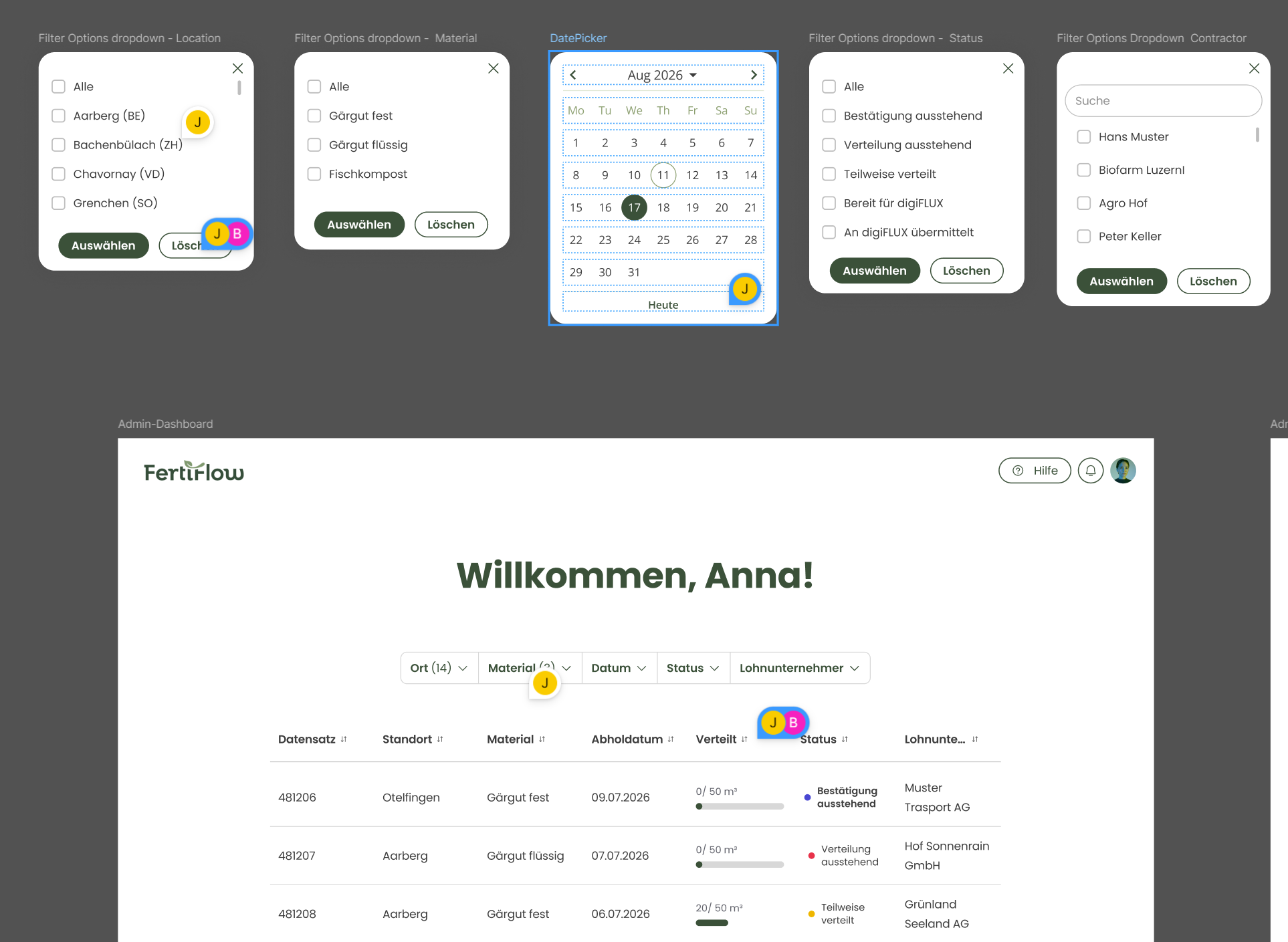
I also defined reusable colour and typography styles in Figma, created new components to support faster iteration and documented the main design decisions.
The goal was not to reinvent established patterns, but to build on patterns that were already familiar and extend them where FertiFlow needed something new.
04/ Designing for real-world exception
After the first conceptualization, we ran out user testing sessions and iterated on the MVP un an agile process.
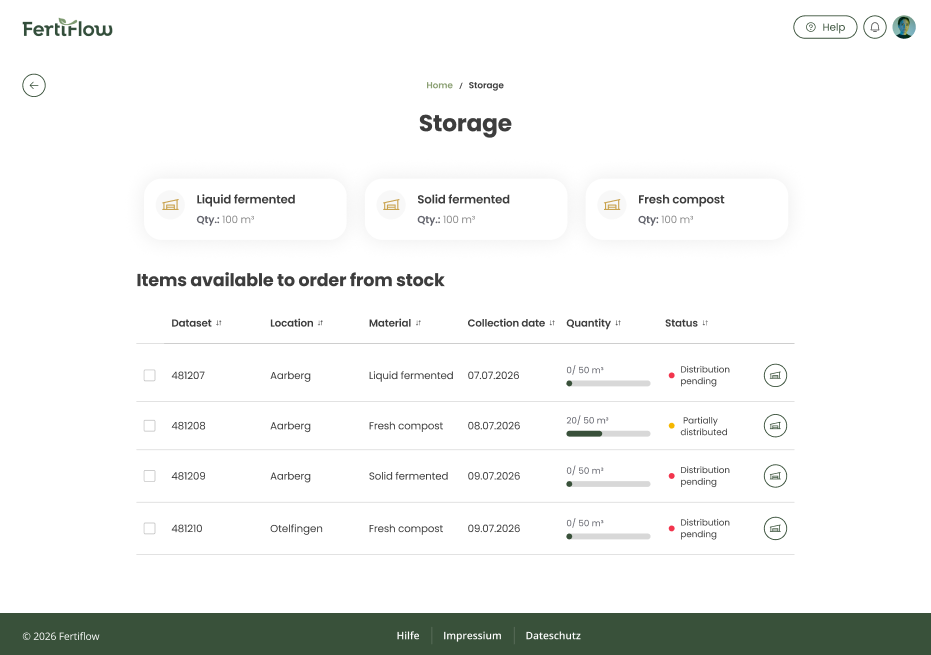
Testing helped us discover something that was difficult to understand from the original requirements alone: sometimes a contractor picks up fertiliser but cannot deliver it immediately, for example because environmental conditions make delivery impossible during the winter months. Therefore, we designed two new features:
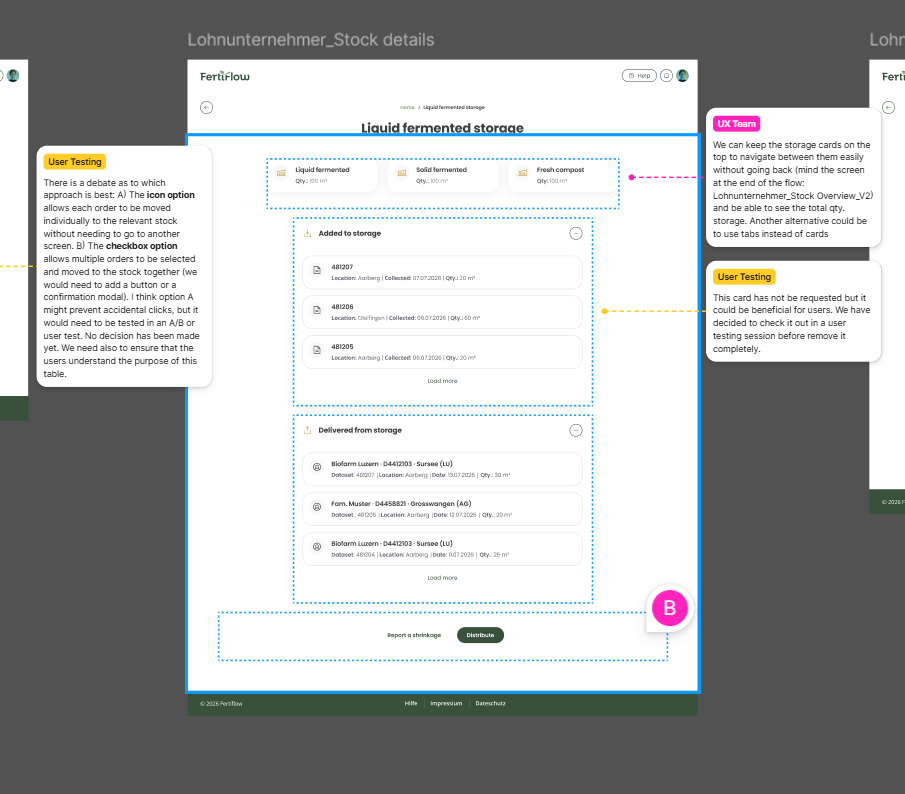
The Storage feature makes collected but unallocated quantities visible. A contractor can keep a quantity in storage and later assign it to an end user when the delivery can take place.
The Shrinkage feature responds to the fact that fertilizer can be volatile, meaning that the quantity can change between pickup and delivery. This feature allows this difference to be reported.
These two features helped us represent real operational situations more transparently and reduced the need for users to find workarounds.
Testing didn't simply validate the original concept. It helped us to discover what the product needed to become.
05/ Balancing UX and technical constrains
Some design decisions changed as we understood the technical constraints behind them. For example, we initially explored keeping more actions directly within the dashboard. During the technical discussions, it became clear that having all of those actions in one place was difficult to support.
Instead of forcing the original concept through implementation, we adapted the experience and moved some functionality into a secondary screen with a dedicated table.
This back-and-forth was an important part of the design process, as the interface and the underlying system could not be designed independently.
06/ Prototyping and validating
I created the MVP screens in English and German and translated the main journeys into an interactive AI-assisted prototype.
This was particularly useful because the product behaviour could be communicated more clearly through interaction than through static screens alone.
The prototype became a shared tool for:
discussing product behaviour,
reducing the number of screens and actions,
validating assumptions,
testing with contractors,
aligning business and development,
and identifying what still needed to be decided.
The project is currently moving from UX definition toward detailed design, implementation alignment and further validation.
Impact
My contribution was not only about defining screens. I helped connect business needs and technical dependencies with the user perspective.
“I not only love the design and how it is documented, but it makes my work much easier: first to onboard into the project and then not to spend time guessing functionality or how to display something correctly. I feel this is the right way to work.”
— Product Developer, Axpo Digital Solutions
A clearer product direction
The MVP created a shared foundation for stakeholder communication and supported clearer decision-making across business, development and UX.
A role-based experience
We defined how the experience changes according to the responsibilities of contractors, plant users and admins.
Real-world scenarios
User testing helped us identify situations such as storage and shrinkage that were not sufficiently represented in the initial concept.
Addressing these scenarios before implementation helped reduce adoption risks and increase the product's ability to support real working conditions.
A reusable design foundation
The project established reusable styles, interaction patterns, design documentation and component requirements, helping the team iterate faster and maintain consistency.
A foundation for development
The work connected UX decisions with technical discussions, helping the business and development teams align around what the product should do and how it could be built.
Reflection
01/ Complex systems can still feel simple
The storage and shrinkage features were a good reminder that requirements documentation does not always describe the complete reality of a process.
Users helped us discover situations that were difficult to anticipate from the initial concept.
Testing did not simply validate the design. It helped us discover what the product needed to become.
02/ Early testing uncovers real workflows
FertiFlow reminded me that enterprise UX is often less about simplifying the system and more about hiding unnecessary complexity from the person using it.
But good UX goes one step further. It considers how people make decisions and how clarity, confidence and trust can support those decisions.
The underlaying service can be complex. The experience does not need to feel that way.
03/ Language is part of the interface
Designing the experience in both English and German showed me how strongly language can affect design. German labels and instructions can take more space, which affects buttons, hierarchy, spacing and how quickly information can be scanned.
That means multilingual design cannot simply be a translation step at the end. The interface needs enough flexibility to support different languages without hiding information or making controls harder to understand.
04/ Interactive prototypes are part of product communication
One of the most interesting things I took from this project was seeing how AI-generated prototypes can change product conversations.
The client already had a clickable prototype when I joined. Later, I also used AI to create a more interactive prototype based on the final design, as I found it more effective for communicating some interactions than the tools I had initially had (Figma).
I used the prototype as a communication tool between stakeholders, helping the team assess product behaviour, discuss assumptions and guide decisions.
This changed the way I think about the role of prototypes. A prototype is not only a way to present a design. It can also become a shared space for discussing how a product should work.
This project made me think more about how design workflows are evolving and how designers can establish clear ways of working when new tools become part of product development.
05/ Designing with engineering, not around engineering
Fertiflow strengthened my ability to work across disciplines. Some of the best decisions came from the back-and-forth between UX and technical constraints. Rather than treating implementation as something that happens after design, I learned to use those conversations to improve the product itself.
That changed how I approach ambiguity:
Understand the problem → make it tangible → test it → discuss the constraints → adapt the solution.
FertiFlow strengthened my confidence in taking an unclear product problem and turning it into something that different teams can understand, discuss and build together.
When the process is complex, good UX makes the right step feel simple.
More projects